Request a withdrawal
Step-by-step: redeem psXDC for XDC on the Withdraw page. Instant while the vault has liquidity, otherwise your request joins the queue and is paid by position.
Withdrawals are self-service: there is no admin approval step and no fixed queue time. Every withdrawal goes through redeemWithQueue, which automatically picks the fastest path your balance and the vault's liquidity allow.
For the full breakdown of how the instant vs queued paths choose themselves, see Withdrawals: Instant vs Queued.
Steps
- Go to stakexdc.com and connect your wallet.
- Open Withdraw under Liquid Staking (stakexdc.com/withdraw).
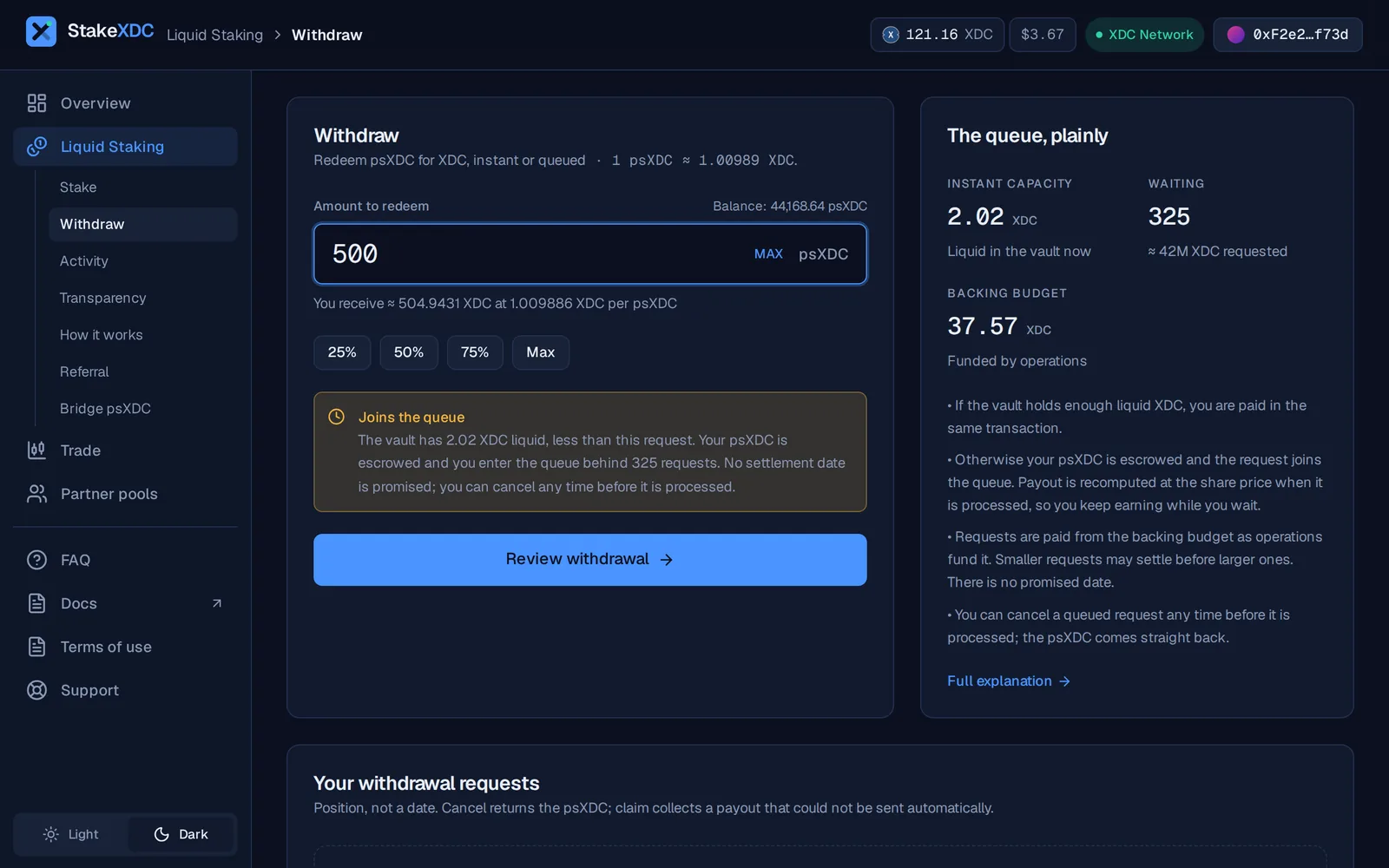
- Enter the amount of psXDC shares you want to redeem. The app shows you, in real time:
- The XDC you will receive based on the current exchange rate.
- The verdict: Instant (settles now) or Joins the queue (enters the queue behind N requests), based on the vault's liquid XDC.
- Click Review withdrawal, then Confirm in wallet. Under the hood the app calls
redeemWithQueue(shares, receiver).
What happens next
If the vault has enough liquid XDC
The redemption settles in the same transaction. You receive XDC immediately. No queue entry is created, nothing else for you to do.
If liquidity is constrained
Your psXDC shares are escrowed inside the vault and a request is added to the FIFO queue. The withdrawal does not have a fixed time; the app shows your position in the queue, never a date. It is settled as the queue's dedicated budget (queueBackingBudget) is topped up — primarily from masternode resignation principal returning after the XDC Network's candidateWithdrawDelay (~35 days under normal block times), routed to the queue by the team. New deposits refill the instant buffer, not the queue. A request the budget cannot yet cover is passed over and retried, so smaller requests may settle first. Your escrowed shares are paid at the exchange rate of the moment they are processed, so they keep earning while you wait.
You can follow the queue at any time in the Your withdrawal requests list on the Withdraw page and in the Queue explorer (Transparency, Withdraw and Overview). When your request is processed, your XDC lands directly in your wallet. Only if the original payout failed for any reason does it land in the vault's pendingQueuedAssets bucket instead; the Withdraw page then shows a Claim … XDC button, which calls claimQueuedAssets to collect it.
You can also cancel a queued request before it settles. The vault returns the escrowed psXDC shares to your wallet, and no XDC moves.
Why a queue exists at all
The vault keeps most of the XDC working in masternodes earning yield and holds only its unencumbered balance liquid for instant redemptions. When demand to withdraw exceeds that, the queue ensures that everyone is served in FIFO order from a ring-fenced budget without forcing the protocol to disrupt active validators (a request the budget cannot yet cover is passed over and retried, never cancelled).
The queue is preferable to an admin-approval model because:
- No admin signature is needed at any point.
- You can cancel at any time and get your shares back.
- Settlement is automatic: anyone can call
processWithdrawalQueueto push the queue forward.
Withdrawals: instant vs queued
Every withdrawal goes through redeemWithQueue. It settles instantly while the vault has liquidity; otherwise it joins a public queue paid by position, recomputed at the share price when processed, and cancellable before processing.
How rewards work
Masternode rewards are distributed into the vault roughly monthly. Each distribution steps up the psXDC share price for every holder; there is nothing to claim. Target ~4.5% APY, not guaranteed.